19th March 2026 - Computer Conundrums
19th March 2026 - Computer Conundrums
As the hardware approached a form of completion and the cold days of winter closed in, thoughts turned to the 'next step'. That was to be the computer based control system for the boiler. What was it going to do? A thermo-couple on the coil at the half way point was intended to provide information on when the feed water input was probably going to turn to steam. The second thermo-couple on the end of the coil, just before the manifold, would show whether the contents was at the desired wet steam condition or too cold or, worse still, super-heated. There would be a long reach domestic stove flue thermometer fitted into the base of the funnel to give an indication of how the fire was doing to save opening the side doors of the casing. These three were all planned to be user interface displays, but the thermo-couple just before the manifold would be linked to the computer. That should/could then control the rate of pumping on the electric feedwater pumps. There is also a motor cycle spark plug in the mainifold which will act as an on/off switch to warn the user, by means of a buzzer, that the manifold needs to be drained of excess feed water. Unknowns at this stage related to how to control the water pump as it would need to be manually set to approximately the correct rate and then handed over to the computer to increase or decrease the flow rate as appropriate.
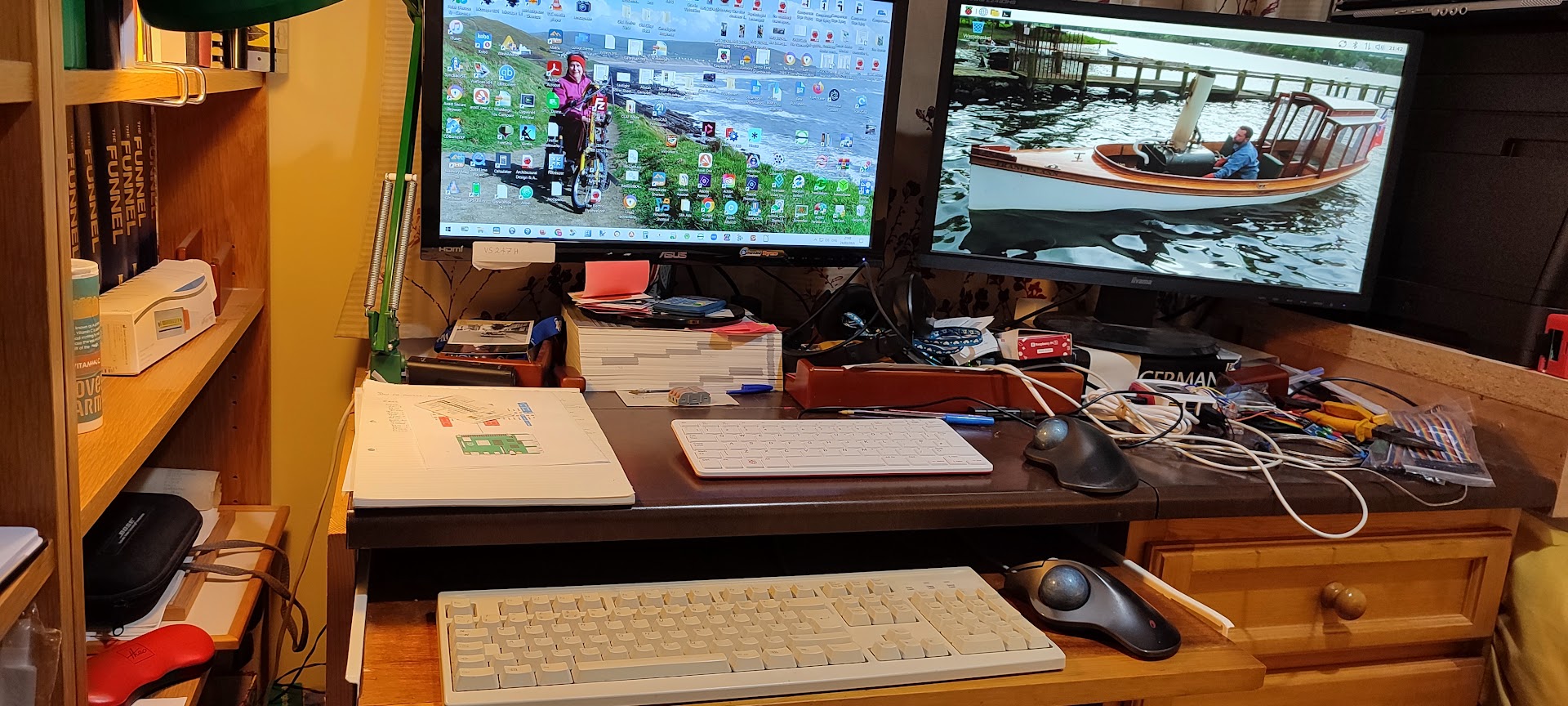
The first step was to acquire the Raspberry Pi 5 which was going to do the 'computing' in the development stage. Once the system was 'sorted' it could then be ported to one of the miniature Pi models for normal operation. The Pi 5 was soon acquired and set up on the study desk along side the 'normal' PC. It was connected to a spare PC monitor and the cheap keyboard that had been used with the original Model B Pi some years previously that had been retrieved from the loft. The initial set up did not look right and it was clear that the screen ratio was wrong. The built in wifi worked but seldom reported a signal above 40% which was not really surprising. An earlier experiment with wifi on the PC had been a failure and so a wired ethernet connection had been put in from the router to the study. The 'trusty' keyboard worked for a little while and then gave up under the graphical user interface, but did work at the command line level. The Raspberry Pi Connect software which allows the PC to connect to and control the Pi worked to a certain extent, but everything had to go through the wifi connection which was not good.
A start was made with the bits of computer hardware and, following some research, a couple of Max 6675 boards were acquired to drive the thermocouples. Deep Seek AI was called upon to provide details of the process of turning the thermocoiple voltage into a temperature reading. It did rather more than expected by providing a Python script to do the job as well as the details of the formulae. With that to hand the first thermo couple was tested, found to be working and via the Python script providing data. It was at this point that things went down hill at speed. The keyboard apparently lost contact with the Pi which rendered it useless. The keyboard was tested on the PC and laptop and performed faultlessly. A spare keyboard was tested on the PI and yielded nothing, but happily drove the PC when asked to do so.
The Pi User Forum was asked about the issue but yielded zero answers so the problem was presented to Deep Seek. That suggested that it was possible that the newly released and very sophisticated Raspberry Pi OS was too much for the keyboard. It was suggested that the previous well tested and robust PI OS should be tried instead. Thus another data card was acquired and the prvious OS was downloaded. The Pi swallowed that and booted up much as before. The keyboard worked, but only for three or four days. At that point I was cheeky and contacted Raspberry Pi HQ to ask if they had come across the problem before and what was their solution. The response was 'No' plus a request to run a seies of test and ship them the outputs. That was no great task and soon sorted out. A little while later a response was received that suggested that the tests did not suggest any fault withthe keyboard, but there was a fault with the monitor. The one I had connected was not compatible with the Pi.
The quick solution, since both machines were sitting on the same desk was to swap the monitors and see what impact that would have. It turned out to be significant. The picture was sharper and the expected setting options to adjust the screen resolution also appeared. As the mouse was still working well it was soon set up to a resolution that seemed comfortable for me. However the lack of a working keyboard was still a nuisance. Looking at the evidence, I had tried three keyboards all of which worked perfectly well on the PC and all had failed on the Pi. I had tried the original new Pi operating system and it did not support the keyboards. I had also tried the previous version and that also did not support the keyboards. Could the problem be a faulty chip on the Pi? I then stuck my neck out and asked the supplier if I could return the machine as faulty in exchange for another one. Without any quibble they sent me a returns form and a new replacement Pi 5 was soon sitting on the desk.
Wired up again the Pi was a complete computer again and the trusty old keyboards worked. Obviously I was as pleased as Punch. That was until a couple of days later when it died completely again. I had, by that stage discovered that there is an 'Official' Raspberry Pi keyboard. It is a diminutive affair in red and white plastic and not particularly expensive. I was advised by my wife to get one as it ought to be guaranteed to work with any Pi. It also appeared to have added advantage of taking up less room on the desk. Another week went by waiting for the keyboard to arrive but the advice was perfectly correct. The new keyboard was recognised and worked properly. I was somewhat amused that the keyboard selector options in the Settings did not have an option for the Raspberry Pi keyboard. Instead I used one that was close to the 79 keys of the new device.
With that problem sorted out all I needed to do was to get Raspberry Pi Connect working. For that I had to swop back to the original OS card and then do some settings for the screen and keyboard. I was pretty otimistic as the system had worked when the Pi had first arrived so making it work with a different screen ought not to be a problem. Unfortunately, it was a problem.
 |